 Skip to content Skip to content


Last Updated: March 20, 2026
Getting your vivo Y33 V2057 smartphone back in working order is straightforward with the official vivo Y33 V2057 firmware. This guide provides the essential USB Driver, Flash Tool, and the vivo Y33 V2057 flash file you’ll need to resolve any software hiccups.
vivo Y33 V2057 Firmware (Flash File) – Drivers, Tools & Guide
Here, you’ll find the original firmware for your vivo Y33 V2057 smartphone. We’ve also included the SP Flash Tool and the necessary MediaTek USB drivers for the flashing process. Everything is conveniently packed in a zip file, which you can easily unpack using software like WinRAR or 7-Zip on your computer. Just make sure the extracted firmware package contains the scatter file; it’s crucial for flashing.
Before you start flashing your phone, it’s a good idea to confirm that your downloaded zip files aren’t corrupted and that they’re the correct ones for your specific Y33 V2057 model. You’ll need a Windows computer and a reliable USB cable to connect your phone. It’s also wise to scan your computer for any malware beforehand. For a smooth flashing experience, follow our step-by-step “How to Flash” guide.
Updating your vivo device with the official stock firmware can fix a variety of software issues. This includes problems like FRP lock, app crashes, sluggish performance, forgotten screen locks, devices stuck on the vivo logo, connectivity issues with Wi-Fi and Bluetooth, rapid battery drain, or even a soft bricked phone.
FRP Bypass Tools for Your vivo Y33 V2057
Sometimes, after flashing or a factory reset, you might run into a Google account lock, also known as FRP. If that happens, our free Android apps launcher tools are here to help you regain access to your device.
Why Do We Need vivo Y33 V2057 Firmware?
Having the correct firmware for your vivo Y33 V2057 is pretty important. It helps boost your phone’s overall performance and resolves many common glitches. Specifically, the stock ROM can:
- Unlock your device if it’s locked.
- Update your phone to the latest Android version available.
- Fix issues like constant restarting, lagging, or freezing.
- Resolve problems with over-the-air (OTA) updates and fix battery drain.
- Restore your phone to its original software state (stock ROM), which can help maintain your warranty.
- Get your phone working again if it only boots into recovery mode.
A simple firmware update can really make your device run smoother and more reliably. Want to learn more about the benefits of stock ROMs? You can read more about stock ROMs here.
Choosing the Right Firmware Version
Before you dive into the flashing process, make sure you pick the correct firmware by following these steps:
- Check Your Device Model: Go to “About Phone” on your vivo Y33 V2057 and confirm that the model number is indeed V2057.
- Verify the Build Number: Look for identifiers like “V2057” within your device’s build details.
- Confirm the Chipset: According to vivo’s official specs, the Y33 V2057 uses the Mediatek MT6769V/CU Helio G80 (12 nm) chipset. This features an Octa-core processor (2×2.0 GHz Cortex-A75 & 6×1.8 GHz Cortex-A55) and a Mali-G52 MC2 GPU.
- Match the Firmware Version: It’s vital to ensure the firmware version and regional details precisely match your device’s specifications. This prevents compatibility problems.
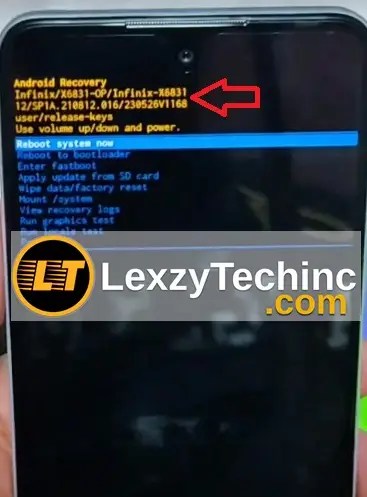
- If you’re not entirely sure about your chipset or the exact firmware version, you can restart your device into recovery mode. There, you might find additional device details.

This will help you identify the correct firmware to flash and which version is best suited for your phone, minimizing any risks.
Firmware Details for vivo Y33 V2057
Here’s a quick look at the official firmware details:
| Firmware Information | Details |
|---|---|
| Device Model | vivo Y33 V2057 |
| Firmware Version | 1.4.18 |
| File Size | 1.2 GB |
| Android Version | Android 11, Funtouch 11.1 |
| Platform | Mediatek MT6769V/CU Helio G80 (12 nm) CPU Octa-core (2×2.0 GHz Cortex-A75 & 6×1.8 GHz Cortex-A55) GPU Mali-G52 MC2 |
| Release Date | Released 2021, October 04 |
| Region | Global, Africa and Asia |
| File Type | ZIP (Includes flash.xml, config.xml, boot.img, system.img, vendor.img, super.img, vbmeta.img, dtbo.img, modem.img, and flash scripts) |
Download vivo Y33 V2057 Firmware
Grab the official stock firmware for your vivo Y33 V2057 from the links below:
| Software Details | Download Link | Members Link |
|---|---|---|
| File Name: Vivo_Y33_PD1422L_MT6735_A_1.4.18_07062015.zip Size: 1.2 GB | Download Link | Download Link2 |
Please double-check that the firmware version you download is fully compatible with your specific device model and regional settings.
Prerequisites
Before you start the flashing process, make sure you have these items ready:
- Back Up IMEI Numbers: Before flashing, it’s crucial to note down and save your vivo Y33 V2057 device’s IMEI numbers.
- Remove Google Accounts: Sign out of all Google accounts on your phone. This helps prevent potential FRP lock issues after the flash.
- Back Up Your Data: Don’t forget to create a backup of all your important information, including apps, music, videos, and photos. Flashing will wipe everything from your device.
- Fully Charged Battery: Ensure your phone has at least 50% battery power.
- USB Cable & PC: You’ll need a dependable USB cable and a computer with available USB ports.
- Essential Drivers: Download and install the following:
- Data Backup: Always back up your important data. This is a must to avoid losing anything during the flashing procedure.
How to Install Firmware on vivo Y33 V2057
You can flash the firmware using the SP Flash Tool with the secure boot Download Agent (for SLA/DAA devices). If you can’t locate the Secure Boot Download Agent (DA) file for this particular model, you might consider using MTK Client for flashing. Here are the step-by-step instructions using the MediaTek (MTK) SP Flash Tool:
- Download and Extract:
- First, download the correct firmware package for your device.
- Then, extract the contents of the ZIP file into a dedicated folder on your computer.
- Install the Required Drivers:
- Make sure both the VCOM Drivers and vivo USB Drivers are successfully installed on your PC.
- Launch the SP Flash Tool on your computer. If you don’t have it yet, you can download the latest version of SP Flash Tool for Windows or SP Flash Tool for Linux. For a more detailed walkthrough, check out the complete SP Flash Tool flashing guide.
- Load the Scatter File:
- Click on the “Scatter-loading” button. Navigate to the folder where you extracted the firmware and select the “scatter.txt” file.
- Connect Your Device:
- Turn off your phone completely.
- Connect your device to your PC using the USB cable. The SP Flash Tool should automatically detect your phone.
- Start Flashing:
- Click the “Download” button to begin the flashing process.
- Keep your device connected and do not interrupt the process until it’s finished.
- Wait and Reboot:
- Once the flashing is successfully completed, disconnect your device from the PC.
- Power on your device. It should now boot into the newly installed firmware.
Missing IMEI or Corrupt Baseband After Flashing?
If you find that your IMEI numbers are missing or the baseband seems corrupt after flashing, try these steps:
- Check Drivers: Ensure that the Mediatek CDC Driver and MediaTek (MTK) drivers are installed correctly on your computer.
- Use an IMEI Repair Tool: Tools like SN Write Tool or Maui Meta for MediaTek can help restore your original IMEI. You can find more information on how to use the Write Tool or Maui Meta here.
- Run the Repair Tool:
- Connect your device to your computer.
- Enter your original IMEI numbers for both SIM slots.
- Click “Start” to begin the repair process.
- Restart Your Device: Once the repair is complete, reboot your phone. You can check if your IMEI is back by dialing *#06#.
Video Guide: How to use Maui META to repair IMEI
Credits: https://www.youtube.com/@mhgsmclinic
Common Issues and Solutions
- Device Not Recognized by PC:
- First, confirm that all necessary drivers are installed correctly.
- Try using a different USB cable or a different USB port on your computer.
- Boot Loop After Flashing:
- If your device gets stuck in a boot loop, try booting into recovery mode and performing a factory reset.
- Flashing Errors:
- Make sure you’ve selected the correct scatter file and that the firmware version is the right one for your specific device model.
Frequently Asked Questions (FAQs)
Q1: Will flashing the firmware erase my data?
A: Yes, flashing the firmware will reset your device to its factory settings. It’s essential to back up all your important data before you begin.
Q2: Is this firmware compatible with other vivo models?
A: No, this firmware is exclusively for the vivo Y33 V2057. Using it on any other vivo model could cause serious problems.
Q3: Can I downgrade my firmware version?
A: Downgrading is generally not recommended. It can sometimes lead to security vulnerabilities and compatibility issues.
Q4: What should I do if I encounter an FRP lock after flashing?
A: If you face an FRP lock, our free Android apps launcher tools can help you resolve the Google account lock issue quickly.
Q5: Are custom ROM options available for the vivo Y33 V2057?
A: This guide focuses on installing the official stock firmware. For custom ROMs, you might want to check our Custom ROMs page or popular tech forums like XDA Developers. You can also find information on sites like Beebom.
Conclusion
By carefully following this guide, you can successfully flash the official stock firmware onto your vivo Y33 V2057. This process helps restore your device’s optimal performance, stability, and security. If you run into any trouble or have more questions, feel free to leave a comment below or reach out to our support team.
Stay informed about the latest firmware updates and tech tips by subscribing to our newsletter or connecting with us on social media.
Disclaimer: Please proceed with flashing the stock firmware at your own risk. It is crucial to follow the instructions precisely to avoid any potential damage to your device.


